GNU/Linux: Where Data Hides and How It's Found
A partition table entry reading "Hidden FAT16." An inode field nobody writes to. A nanosecond timestamp carrying encoded data. Where GNU/Linux hides evidence and how investigators find it.

A filesystem can tell an investigator that everything is consistent while still leaving data outside the paths that ordinary tools inspect. Hidden filenames are the easy case. More interesting cases involve unused or reserved filesystem structures that can contain data without changing the metadata an examiner would normally check.
This article looks at those hiding surfaces from a forensic perspective across ext3/ext4: what they are, why standard tools can miss them, and what an investigator should examine when the default filesystem view doesn't tell the whole story.
Hidden in the Name
The cheapest method on GNU/Linux is convention, not a stored attribute. ls skips any filename starting with a dot unless -a is passed, and renaming a file adds nothing to any metadata field; it changes only what a default listing chooses to show.
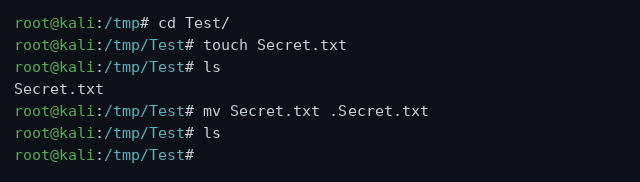
touch Secret.txt, ls shows it, mv Secret.txt .Secret.txt, and the next ls shows nothing. The file still exists; the listing simply isn't asking to see it.
A related trick creates directories named ". " or ".. " with trailing spaces. These names sit in the same listing position as the real . and .. shortcuts but don't collide with them, and a default ls won't surface them either. It's a filesystem curiosity more than a serious hiding technique, and it falls apart the moment ls -al is run carefully and every entry's name is read in full.
Finding it: ls -a in the terminal, or Ctrl+H in most graphical file managers. The GUI toggle typically only covers the open directory, so the terminal check is the reliable one. Dotfiles and trailing-space directories are worth ruling out first precisely because they're the cheapest checks, not because serious hiding is likely to stop there.
Partition-Type Metadata
Every partition carries a type identifier in the partition table that tells the OS how to treat it. On ext-family systems, sfdisk can reassign that identifier directly. Changing a partition's type to 16 marks it as Hidden FAT16:
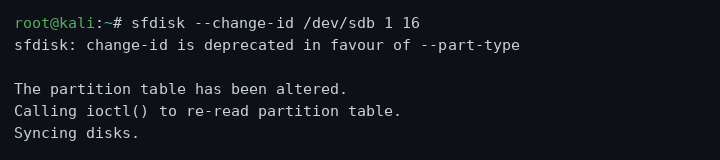
sfdisk --change-id /dev/sdb 1 16 (the modern equivalent is --part-type). The partition table is rewritten on disk immediately.
A subsequent listing confirms the change landed:
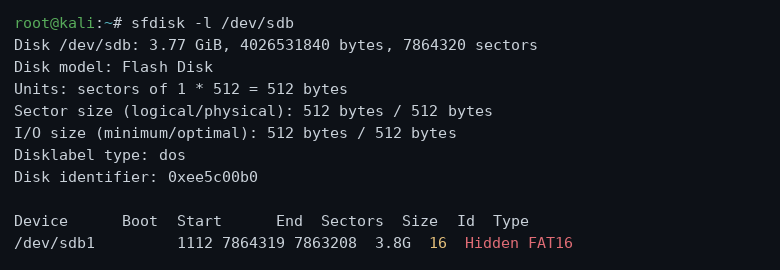
The partition table now reports "16 Hidden FAT16" as the type. Changing a partition's declared type is an actual metadata modification, and that's a meaningful distinction from Windows' drive-letter removal, which only affects what's displayed without touching the partition table itself.
From a forensic standpoint the question isn't only whether a partition is hidden. Any partition whose type identifier is unexpected given the surrounding storage layout is worth examining. A "Hidden FAT16" type on a device that should contain only native Linux partitions warrants inspection regardless of whether the OS was mounting it.
Finding it: sfdisk -l on the raw device reports every partition's type regardless of whether it's mounted. Unexpected type identifiers, particularly in the "hidden" category, warrant examination of that partition's raw contents. Restoring visibility is the reverse command, --part-type 83 for a standard Linux partition, though an examiner should image the partition before modifying anything.
Disguised Files
Changing a file's extension is the same cross-platform trick as on Windows: the OS opens files by extension, so a binary renamed .jpg either fails to display or returns garbage in an image viewer, which can be enough to make it effectively invisible to a quick inspection.
The file command doesn't consult the extension at all. It reads the file's actual content and reports what the bytes say:
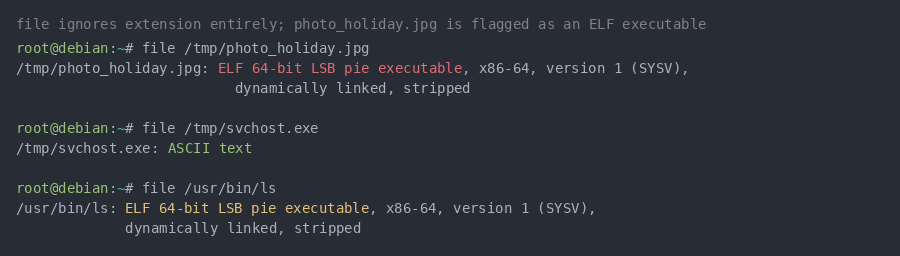
photo_holiday.jpg is flagged as an ELF 64-bit executable. svchost.exe is flagged as ASCII text. The extension in both cases is contradicted by the content.
For binary content where the format isn't immediately obvious, the opening bytes of the file carry a signature. 7F 45 4C 46 is the ELF magic number marking every Linux executable regardless of what name sits on the file:
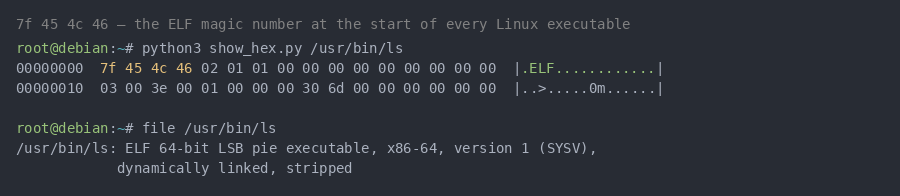
The first four bytes of /usr/bin/ls read 7f 45 4c 46, the ELF magic number. A file claiming to be a .jpg that opens with these bytes is an executable, not an image.
Finding it: file is the fastest first check on GNU/Linux; it doesn't care about the extension and reports the actual identified format. For text-based content disguised under a foreign extension, strings extracts any printable characters and will immediately surface readable content where binary data is expected. A magic-number check confirms format, not that the file is safe, complete, or functional, the same qualification that applies to any signature-based check.
File Slack Space
Files rarely consume their allocated blocks exactly. The gap between a file's actual size and its allocated block size is dead space the OS doesn't clear, and Bmap writes into it directly:

./bmap --mode slack test.txt targets the slack space trailing the named file. The same principle as Slacker on NTFS: allocated space and used space aren't the same thing.
Ext-family file systems carry additional slack-space candidates that NTFS doesn't have a direct equivalent for: the reserved bytes at the end of every superblock (at least 384 bytes, documented as unused), and the redundant superblock copies distributed across the volume. Neither of these is a secret location. Both predate ext4 and have been documented in forensics research since at least the mid-2000s.
Finding it: bmap in recovery mode extracts data it placed in file slack. Where the writing tool isn't known, a hex editor pass after the file's genuine EOF marker will surface any content written into the trailing slack. For superblock-adjacent areas, dumpe2fs reports the exact block offsets of every superblock copy, giving the examiner a target to inspect directly at the byte level.
Inside ext4's Own Structures
This is where the GNU/Linux forensic picture diverges from Windows most significantly. NTFS has Alternate Data Streams as a single documented mechanism. Ext4's surface for carrying unaccounted data is spread across several internal structures, each described in separate research with no single unified name for the whole category.
Superblock and boot sector layout. dumpe2fs on a freshly created ext4 volume shows the full layout:
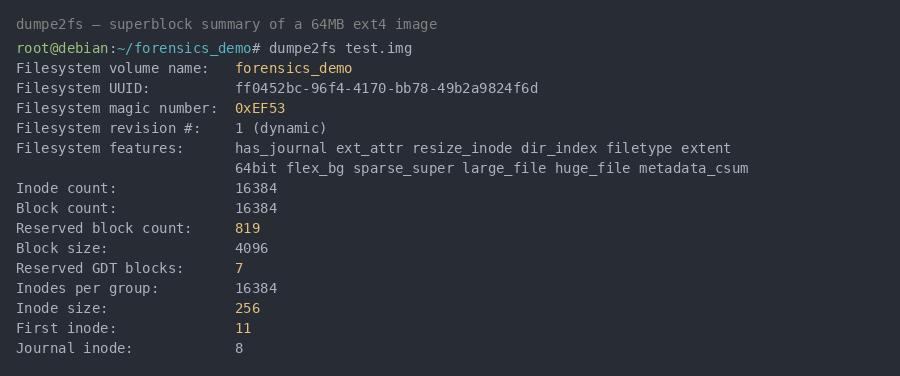
dumpe2fs test.img. The fields worth noting for forensic purposes: Reserved GDT blocks: 7, First inode: 11, and Inode size: 256. Each of these figures into where unaccounted data can sit.
The first 1024 bytes of any ext4 volume are a reserved boot sector that ext4 itself never writes to on a non-bootable device. Any content found there is either a bootloader or something the OS didn't put there.
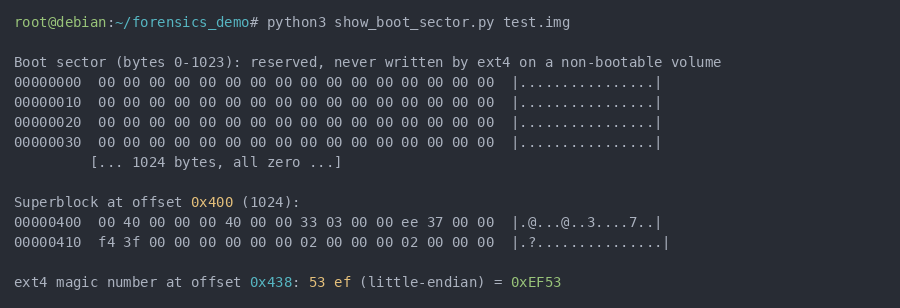
Bytes 0 through 1023 are zeroed on a non-bootable volume. The superblock starts at 0x400. The ext4 magic number 0xEF53 sits at 0x438. Non-zero content in the reserved boot sector region is worth examining.
Group descriptor table reserved blocks. The group descriptor table lists one entry per block group, repeated in backup copies across the volume. Reserved blocks sit behind the live descriptors in each copy:
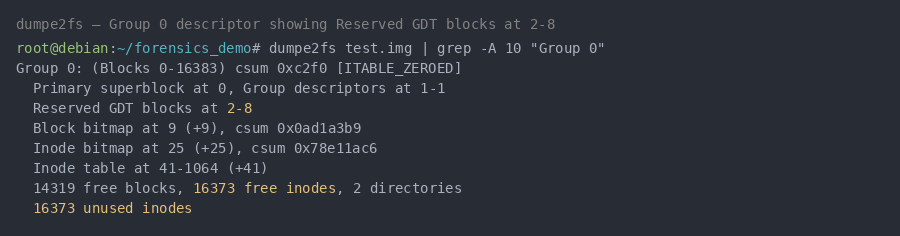
Group 0's descriptor explicitly lists "Reserved GDT blocks at 2-8." These blocks are designated for future filesystem expansion and are never written to during normal operation. Göbel and Baier (2018) document them as a hiding location.
Inode reserved fields. Each inode is 256 bytes in a standard ext4 volume, and not all of it is used. A raw inode dump via debugfs shows the full byte layout:
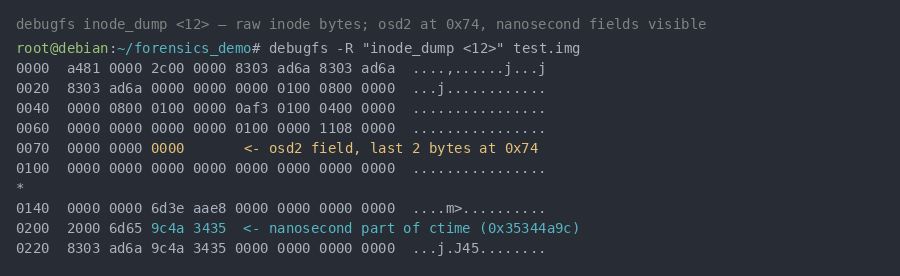
debugfs -R "inode_dump <12>" on inode 12. The osd2 field sits at offset 0x74; its last two bytes are documented as reserved. The nanosecond components of the timestamps are visible in the later rows. Neither of these fields needs to contain meaningful data for the file system to function normally.
Reserved inodes 9 and 10 (which carry no assigned purpose in ext4) provide additional space that Göbel and Baier's 2018 research documents as usable without triggering errors in a standard e2fsck run.
Timestamp precision. Every ext4 timestamp carries nanosecond-level precision well beyond what most tools display:
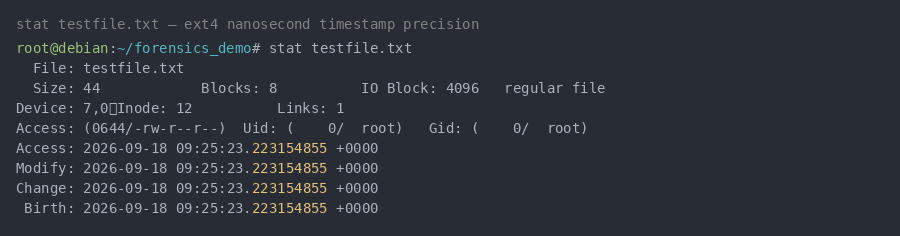
stat testfile.txt on an ext4 volume. The .223154855 nanosecond component is present on every timestamp. The same 2018 Göbel and Baier research demonstrates that this sub-second field has genuine steganographic capacity: data encoded there survives normal filesystem operations, and almost no tooling inspects timestamp precision below the second.
The forensic question with timestamps isn't whether nanosecond data exists; it always does. The question is whether the nanosecond values are consistent with normal filesystem activity or show statistical patterns that suggest deliberate encoding.
What detection actually looks like here. Standard tools have no reason to flag any of this. ls, stat, and a default fsck run all report the filesystem as consistent, because nothing in these techniques violates the filesystem's own rules. e2fsck does, in some cases, correct manipulated inode checksums during a forced check, and a checksum mismatch is itself a signal worth noting. But Göbel and Baier's research is explicit that several of these techniques survive a standard forced check without triggering repair. The realistic baseline is deliberate, targeted examination at the byte level using debugfs, dumpe2fs, and a hex editor, informed by knowing these specific locations exist. slack_hider is a current Python tool that manages file slack data and can assist with targeted recovery. The ext4 techniques also aren't unique to that filesystem: a 2025 survey (Schwietert and Hilgert) documents equivalent reserved regions in Btrfs and XFS, which suggests this is a general property of how filesystems are designed, not a quirk specific to ext4.
Why Standard Tools Don't Cover Everything
Every section above points at the same underlying issue. Bringing it together:
lsreports names. It doesn't examine inode fields, bitmap padding, or reserved structures.statreports the inode's declared metadata. It doesn't examine whether the inode's reserved bytes carry anything, and it displays timestamps at second or millisecond precision by default even though the underlying data is at nanosecond precision.fsckchecks filesystem consistency. Consistency and cleanliness aren't the same thing. A filesystem can pass every consistency check while carrying data in reserved fields, slack regions, or the pre-superblock boot sector.Partition listings show declared types. A type identifier in the partition table is metadata that can be modified independently of the data on the partition.
File signature checks identify format. They don't confirm the file is complete, unmodified, or free of appended content.
Disk encryption changes the problem entirely. Where VeraCrypt or LUKS is in use, the question moves from detection to key recovery. A correctly configured encrypted volume doesn't yield to signature-based or brute-force approaches in any practical timeframe, and that statement applies to the cryptography, not necessarily to every deployment; weak passphrases and accessible key material have defeated encryption in specific documented cases.
Forensic Reference
| Surface | What changes | Why standard tools may miss it | Examination approach |
|---|---|---|---|
| Dotfiles | Filename | ls omits by default |
ls -a, ls -al |
| Trailing-space directories | Filename | Visual pattern-match to ./.. |
Careful ls -al read, automated name check |
| Partition type | Partition table metadata | OS may not mount it | sfdisk -l on raw device |
| File extension | Filename only | OS opens by extension | file, magic-number check |
| File slack | Uncleared allocated bytes | Normal file size unchanged | Raw block read past EOF |
| Superblock reserved bytes | Filesystem structure | Never inspected during normal use | dumpe2fs offsets, hex editor |
| GDT reserved blocks | Filesystem structure | Designated for future use, never written | dumpe2fs Group descriptor, hex editor |
| Inode reserved fields | Inode bytes at 0x74, reserved inodes 9/10 |
No core inode field modified | debugfs inode_dump, byte-level inspection |
| Bitmap slack | Unused inode bitmap tail | Part of normal bitmap allocation | Raw filesystem read at bitmap offset |
| Timestamp nanoseconds | Sub-second timestamp field | Most tools display to second precision | stat, debugfs, statistical analysis |
| Disk encryption | Entire volume | No signature-based approach applies | Key recovery |
Key Takeaways
Dotfile and trailing-space tricks are the easiest to create and the easiest to find.
ls -acosts nothing to run and should precede everything else.Changing a partition's type identifier is an actual on-disk metadata change, not a display toggle.
sfdisk -lon the raw device surfaces it; examining the partition's contents before modifying anything is the right order of operations.The
filecommand is more reliable than extension inspection for disguised files on GNU/Linux. A magic-number check tells you what the bytes claim to be, not what the file was intended to do.Ext4's hiding surface doesn't map to a single equivalent feature the way NTFS Alternate Data Streams do. Reserved inode fields, GDT reserved blocks, bitmap slack, and nanosecond timestamp fields are separate structures, each documented in separate research, and no single command covers all of them the way
dir /rcovers ADS on Windows.Göbel and Baier's 2018 work puts hiding capacity at roughly 8MB through inode-field techniques on a 64GB volume and over 60MB on a 500GB volume. That's a meaningful amount of storage in locations that most forensic suites don't inspect by default( Göbel, T., & Baier, H. (2018). Anti-forensics in ext4: On secrecy and usability of timestamp-based data hiding. Digit. Investig., 24 Supplement, S111-S120.).
A filesystem reporting "consistent" does not mean an examiner has inspected every byte that can contain evidence.
Second in a series on data hiding and recovery across Windows and GNU/Linux. The next piece moves off the filesystem entirely, into the network layer: covert channels, onion routing, and protocol manipulation.