The Firewall Is the Target Now: A Practical Audit Checklist
Where I’d start a firewall audit; the device, the rules, the traffic and the process

In 2020 I was a network security engineer at a firewall partner that had deployed a large number of firewalls across the region, from small businesses to large enterprises. When the company set out to build a cyber security department, I proposed firewall auditing as a service. Our partners handled the implementations, so we wouldn't be reviewing our own work, and the idea went ahead. I moved into the new department as one of its first cyber security engineers.
The first thing I had to produce was a baseline: what does a firewall audit actually check? I put together a ten-page document from internet searches, with standards mappings, two dozen guidelines and a handful of best practices. I reread it recently. A good part of it still holds. Some of it reads the way a twenty-year-old iptables tutorial does now, written for a different generation of tools and threats.
What follows is the version I'd hand someone today. It keeps what held up, drops what didn't, and adds what the last few years made impossible to ignore.
Before you start: gather evidence
An audit is only as good as what you collect before you begin. At a minimum:
A full configuration export, including the rule base, NAT rules, objects and interfaces.
Rule hit counts covering a meaningful period, ideally ninety days or more.
The list of administrator accounts and how they authenticate.
The firmware or software version, and the vendor's support dates for the hardware and the software.
A sample of traffic and admin logs, and confirmation of where logs are sent.
Change records for the same period as the hit counts.
A current network diagram, or whatever the organisation has that passes for one.
Then decide what you're measuring against. If the organisation is certified or assessed against a framework, map your findings to the version they're actually held to. For ISO 27001, that's the 2022 edition now. The transition period ended on 31 October 2025, and 2013 certificates have expired or been withdrawn (BSI). The controls you'll reference most for firewalls are 8.20 (networks security), 8.21 (security of network services), 8.22 (segregation of networks), 8.15 (logging), 8.16 (monitoring activities), 8.17 (clock synchronisation), 8.9 (configuration management) and 8.32 (change management). For NIST 800-53, it's SC-7 (boundary protection) and its enhancement SC-7(5) for deny by default, AC-17 (remote access), AU-2 and AU-12 (logging) and CM-3 (configuration change control).
Check every control number against the standard itself. I learned this one the hard way. My 2020 mapping table had PCI DSS wording sitting under ISO labels, and NIST rule numbers that don't exist anywhere in 800-53, because I copied them from search results without opening the source documents. A finding mapped to the wrong control is a finding nobody can act on.
Start with the device itself
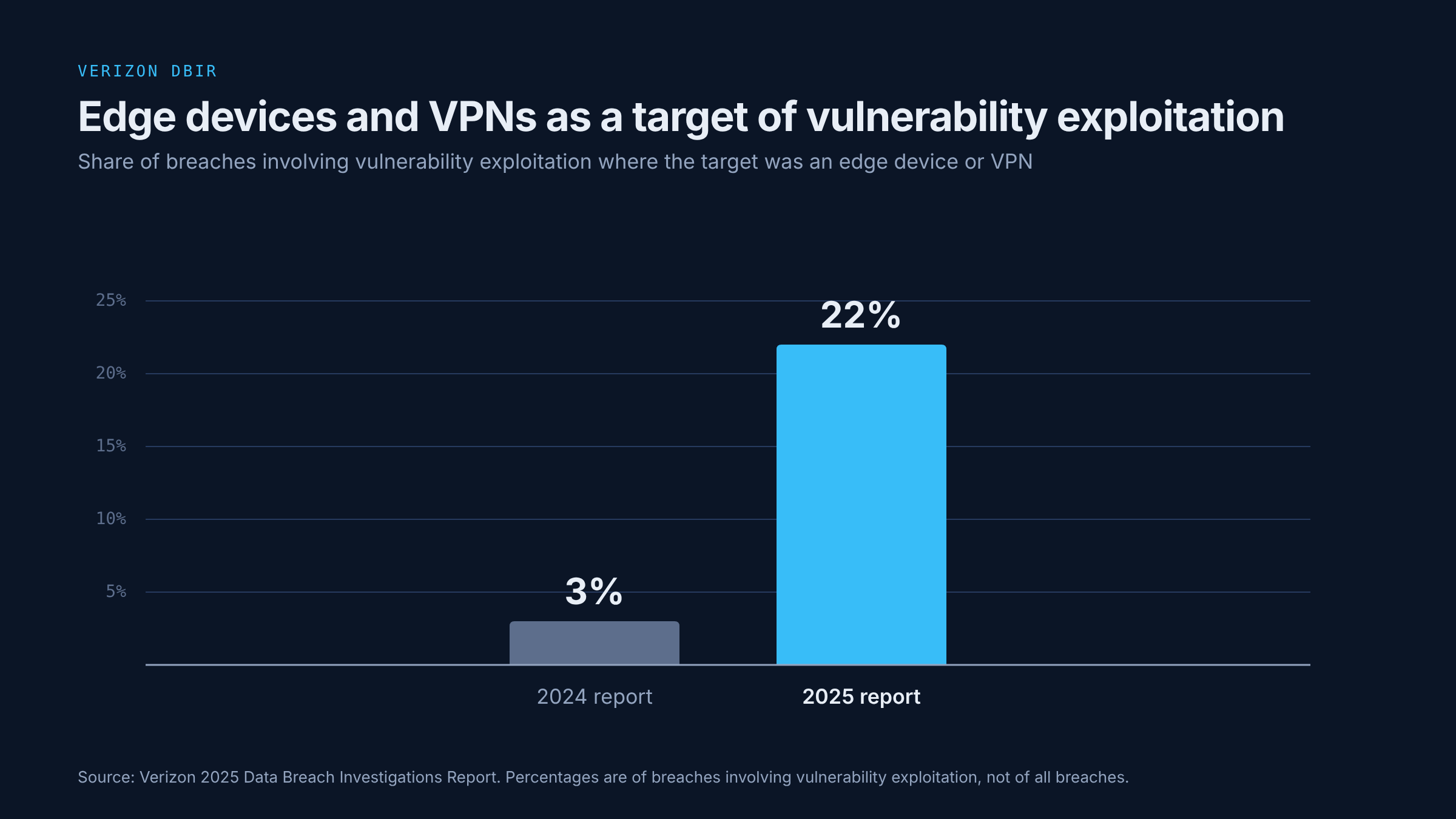
In 2020, I treated the firewall purely as the thing doing the protecting. That no longer holds. Verizon's 2025 Data Breach Investigations Report found that among breaches where attackers exploited a vulnerability, edge devices and VPNs were the target in 22% of cases, up from 3% the year before (Verizon DBIR). In September 2025, CISA issued Emergency Directive 25-03 after attackers exploited zero-days in Cisco ASA and Firepower software. On some ASA devices, they modified read-only memory to keep access through reboots and upgrades (CISA). In April 2026, Cisco and Australia's ACSC warned that malware from the same campaign, called FIRESTARTER, could stay on some Firepower and Secure Firewall devices even after they'd been patched and upgraded (Cisco, ACSC). When a firewall has been exposed to an actively exploited vulnerability, the audit should also check the vendor's published indicators of compromise, whatever version it's running now.
So before looking at a single rule, look at the box:
Management access. The management interface should be reachable only from a dedicated management network. If you can reach the login page from the internet, that's the first finding in the report. Management should be over SSH and HTTPS, with Telnet and plain HTTP disabled.
Exposed services. List every service the firewall itself offers to the outside: VPN portals, user authentication pages, API endpoints. Each one needs a business reason, and each one is part of the attack surface.
Firmware and support. Confirm the version is within vendor support, and compare it against the vendor's security advisories and CISA's Known Exploited Vulnerabilities catalogue. For an internet-facing firewall, I treat a known exploited vulnerability as a matter of days, and a quarterly maintenance window is too slow for it. That's a risk-based target. Where a regulator or directive sets its own deadline, that deadline applies, and if no patch exists yet, the vendor's mitigations go in first. Note end-of-support dates for both hardware and software, so the replacement is planned before the date arrives.
Administrator accounts. Every admin should have a named account, with MFA where the platform supports it. Remove accounts that nobody uses, and check that shared or default accounts are disabled or have had their passwords changed.
Logs and backups off the box. Traffic logs, admin command logs and configuration backups should all be sent somewhere else. If the device is ever compromised, its own copy of the evidence can't be trusted. Point the firewall at an NTP source, so its timestamps line up with everything else you'll need to correlate them against. Then ask when a configuration backup was last restored. A backup nobody has tried to restore is only a hope.
Then review the rule base
This is where most of the 2020 document still holds up, and where most findings usually come from.
Order and shadowing
In 2020 I documented a preferred order for a rule base: anti-spoofing first, then user and management permits, then noise drops, then deny rules at the bottom. Today I'm much less interested in enforcing a particular sequence, and far more interested in whether the policy actually does what it's meant to.
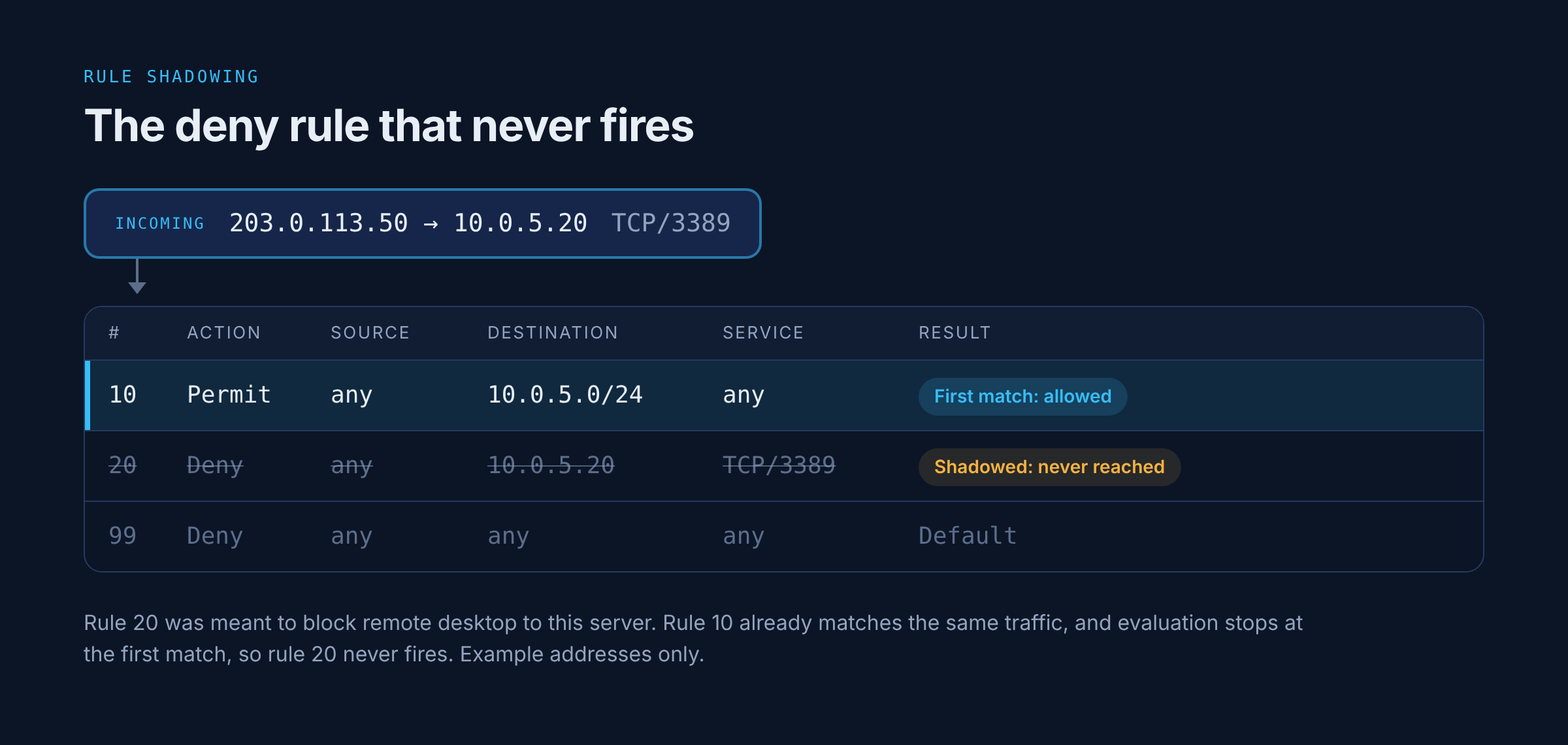
Most network firewalls evaluate rules from the top and stop at the first match, so a broad permit sitting above a narrower deny wins every time, quietly. Look for exactly that: shadowed rules, overly broad permits, exceptions placed in the wrong spot, and any difference between the policy as configured and the policy as it behaves. Most platforms have a policy lookup or packet trace tool that shows which rule a given flow would hit. Running a handful of known flows through it is one of the quickest ways to find out whether the rule base matches anyone's intent.
The default action
My 2020 document recommended an explicit any-any-any drop rule with logging at the bottom of every zone. I'd be more careful with that advice now. Platforms handle default traffic differently. Palo Alto Networks firewalls, for example, allow traffic within the same zone and deny traffic between zones by default, so a blanket deny rule added without thought can cut off legitimate same-zone traffic.
What to check instead is the effective default action for each zone, interface or policy context. Where the policy is meant to deny by default, confirm that it does, and that denied traffic is logged. On some platforms the cleanest way to get there is an explicit cleanup rule. On others, it's enabling logging on the built-in default rules. Whichever applies, test it against the traffic that's supposed to keep flowing before it goes in. Then check the volume. Logging every dropped packet on a busy internet edge can bury the useful entries, so the logging should be set at a level someone will actually review.
Documentation for every rule
For every rule, record its purpose, the services it affects, the users and devices it affects, the date it was added, when it should expire if it's temporary, and who requested it. I'd keep this item word for word from 2020.
A rule without a recorded purpose is very hard to judge. You can see what it does, but not why it exists, and nobody wants to be the person who removed the rule that turned out to matter. So it stays, and the rule base grows. Push hardest on expiry dates. A temporary rule only gets removed if something forces the question when its date arrives.
Rule usage
Use the hit counts you collected:
Rules with zero hits over the review period are worth investigating. Some exist for disaster recovery, failover or seasonal traffic, so confirm with the owner before anything is removed, and remove it through change control.
Shadowed rules sit below a broader rule that already matches everything they would, so they never fire.
Redundant rules duplicate what another rule already allows.
Broad permit rules, especially any source, any destination or any service, should each have a documented justification, and be narrowed wherever practical.
Temporary rules past their expiry date go straight into the report.
NAT and the security policy
You've already collected the NAT rules, so read them alongside the security policy. Depending on the platform, security rules may be written against pre-NAT or post-NAT addresses, and a mismatch between the two is a common source of rules that look restrictive but aren't. Check every inbound static NAT or port forward. Each one creates a translation path to an internal host. Check whether the security policy and routing actually make that host reachable, and make sure any access that is allowed is limited to the intended sources and services.
Application identification
Most firewalls sold today can identify applications directly, and a large share of traffic runs over 443 whatever it actually is. A rule allowing 443 says very little about what's allowed. Where the platform supports it, check that rules use application identification, and whether TLS inspection has been considered. That decision is risk-based. It has to account for privacy, legal obligations, performance, and the applications that break under inspection and need exceptions.
Check what the traffic policy actually allows
Inbound exposure
My 2020 document had a long table of ports to block. The intent behind it was right, even if the table itself had problems. Some services should never be reachable from the internet unless someone has deliberately decided to expose them: remote desktop, SMB, SNMP, database ports, Telnet, and management interfaces of any kind.
The way to check is from the outside. With written authorisation, an agreed scope and an agreed testing window, scan the organisation's public addresses with nmap or a similar tool, and compare what's open against what the rule base says should be open. Any difference between the two needs investigating, in whichever direction it goes. It may be a firewall misconfiguration, or it may be an upstream device, a cloud service or a stale record, so confirm the cause before it goes in the report as a firewall finding.
Egress filtering
Outbound policy is often a single allow-all, and it tends to get far less attention than inbound. It matters more now than it did when I first wrote it down. Malware calling out to command and control infrastructure, and data leaving the network, both depend on outbound access. At a minimum, outbound traffic should only carry the source addresses you expect from the networks behind the firewall, which depends on how NAT and routing are set up, with anything else dropped and logged. Better still, outbound access should be restricted by destination and application for anything that doesn't need general internet access, servers especially.
Anti-spoofing
Traffic arriving from the internet with a private, reserved or otherwise impossible source address should be dropped. That covers the RFC 1918 ranges (10.0.0.0/8, 172.16.0.0/12, 192.168.0.0/16), loopback (127.0.0.0/8), 0.0.0.0/8, link-local (169.254.0.0/16), carrier-grade NAT space (100.64.0.0/10), multicast as a source (224.0.0.0/4), the reserved 240.0.0.0/4 range, and the documentation ranges. Use a maintained bogon list where the platform supports one, since hand-typed lists drift out of date. Block source routing while you're there.
ICMP
Blocking ICMP entirely causes more problems than it solves. Path MTU Discovery relies on a specific unreachable message getting back to the sender, and when it's dropped, some connections hang as soon as a packet is too big for a link along the way. Allow the ICMP types that are needed, rate-limit them, and block echo requests from the internet if policy calls for it. For IPv6, RFC 4890 sets out which ICMPv6 messages need to pass, since IPv6 depends on them for basic operation.
IPv6
If IPv6 is enabled on any interface, its policy needs the same review as IPv4. It's common to find a carefully maintained IPv4 rule base sitting next to an IPv6 policy that nobody has looked at since the device was installed.
Review the process around it
Change control. Every change should go through a request, a review, testing before it reaches production, deployment, validation afterwards, and a record. Sample a few recent changes from the change records and trace each one to a rule in the configuration. Then go the other way: pick a few recently added rules and look for their change records.
Periodic review. A rule base reviewed once at installation and never again will drift. Agree a review cycle, quarterly or every six months depending on how often the rules change, and check that the last one actually happened.
High availability. If there's a standby firewall, check when failover was last tested. A standby that nobody has failed over to is untested in every way that matters.
From evidence to finding
A checklist tells you what to look at. The report needs more than a tick or a cross. Each finding should carry the evidence behind it, what that evidence means, and what should happen next. Three simplified examples, of the kind this checklist is built to catch:
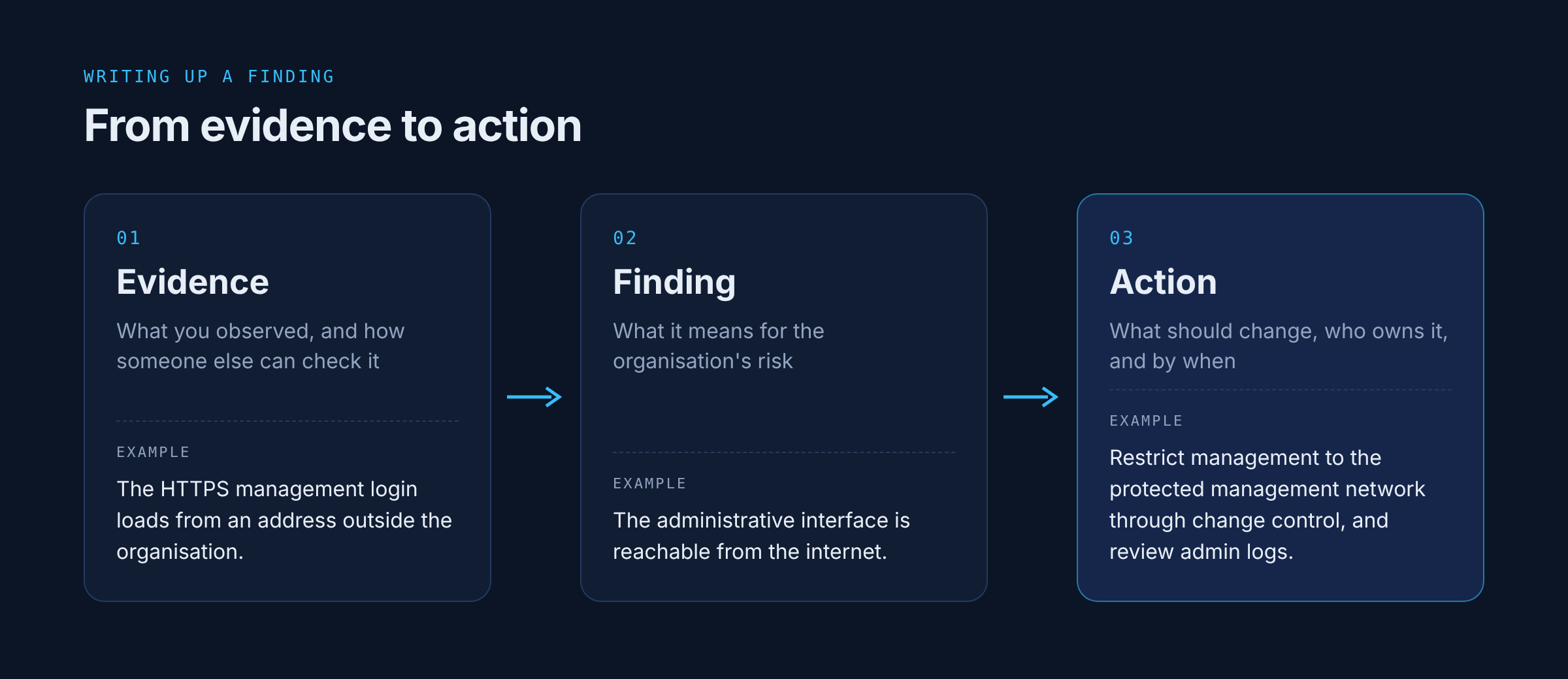
An exposed management page
Evidence: the firewall's HTTPS management login loads from an address outside the organisation.
Finding: the administrative interface is reachable from the internet.
Action: restrict management access to the protected management network through change control, and review the admin logs for logins from unexpected addresses.
A temporary rule that stayed
Evidence: a permit rule tagged as temporary, with an expiry date six months in the past, still matching traffic.
Finding: an exception that nobody has reviewed since it was due to end.
Action: confirm with the owner whether anything still depends on it, then remove it or renew it properly with a new expiry date, either way through change control.
Firmware past its support date
Evidence: the running software version reached end of support last year.
Finding: the software is outside standard vendor support, so security fixes may no longer be available, and newly discovered vulnerabilities could stay unpatched.
Action: check the version against known exploited vulnerabilities, apply any available mitigations, and plan the upgrade or replacement with a date attached.
The action is the part that tends to get skipped, and a finding without one rarely gets fixed.
A note on cloud firewalls
These days I work as a consultant, and every so often someone asks me to review their cloud firewalls: security groups, network ACLs, or the cloud provider's own firewall service. Those reviews take me back to 2020, and they also remind me how different it feels. A network firewall has a rule base with an order to it, a cleanup rule at the bottom, and logs coming off the device. In AWS, a security group is a set of allow rules attached to a network interface, all evaluated together, with no deny rules and no order. Network ACLs do have ordered rules, but they're stateless, and logging lives somewhere else entirely in VPC flow logs that someone has to switch on. It does the job. It just doesn't have the same soul as a network firewall.
Most of the checklist carries over, with a little translation:
Default deny comes free for inbound traffic in a new security group, which starts with no inbound rules. The default security group in each VPC is different, since it allows inbound traffic from anything else attached to the same group. And outbound is another matter, since new security groups allow all outbound traffic unless someone restricts it.
Rule documentation lives in descriptions, tags, and the commit history of whatever infrastructure-as-code defines the rules.
Change control is the deployment pipeline, as long as nobody is making changes directly in the console.
Management access means checking for SSH or RDP open to 0.0.0.0/0, which is still one of the first things I look for.
Logging needs to be confirmed as switched on.
The checklist
If you only take one thing from this, take this list.
The device
Management interface reachable only from a management network, over SSH or HTTPS.
Every externally exposed service has a business reason.
Firmware within vendor support, with known exploited vulnerabilities patched or mitigated quickly.
Named admin accounts with MFA, and unused or default accounts removed.
Logs and configuration backups sent off the device, with NTP configured and a backup restore tested.
The rule base
No broad rule overriding a narrower one, checked with the platform's policy lookup tool.
Effective default action confirmed for each zone, with denied traffic logged at a reviewable volume.
Every rule has a purpose, an owner, a date added, and an expiry if it's temporary.
Unused, shadowed, redundant and expired rules investigated, and removed through change control.
Broad permit rules identified, justified, and narrowed wherever practical.
Inbound NAT rules matched to security rules that restrict them.
Application identification used where the platform supports it.
The traffic
An authorised external scan matches the intended inbound policy, with any differences investigated.
Outbound traffic restricted, with drops logged.
Anti-spoofing from a maintained bogon list, for IPv4 and IPv6.
ICMP filtered by type, with rate limits that keep essential functions such as path MTU discovery and ICMPv6 working.
IPv6 policy reviewed to the same standard as IPv4.
The process
Changes traceable from request to rule, and from rule back to request.
Rule base reviewed on an agreed cycle.
Failover to the standby tested.
Findings mapped to the framework version the organisation is actually assessed against, checked against the source standard.
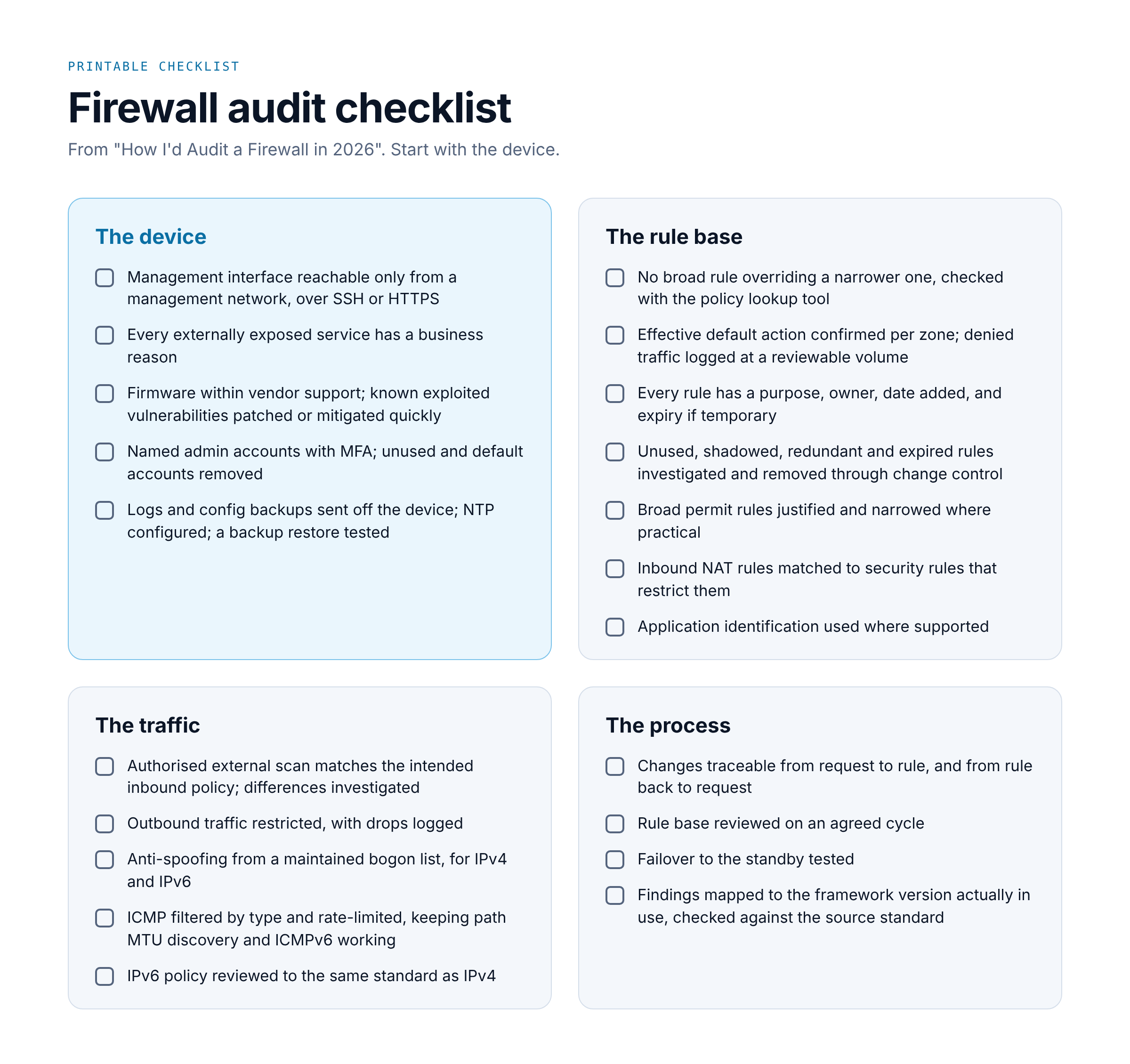
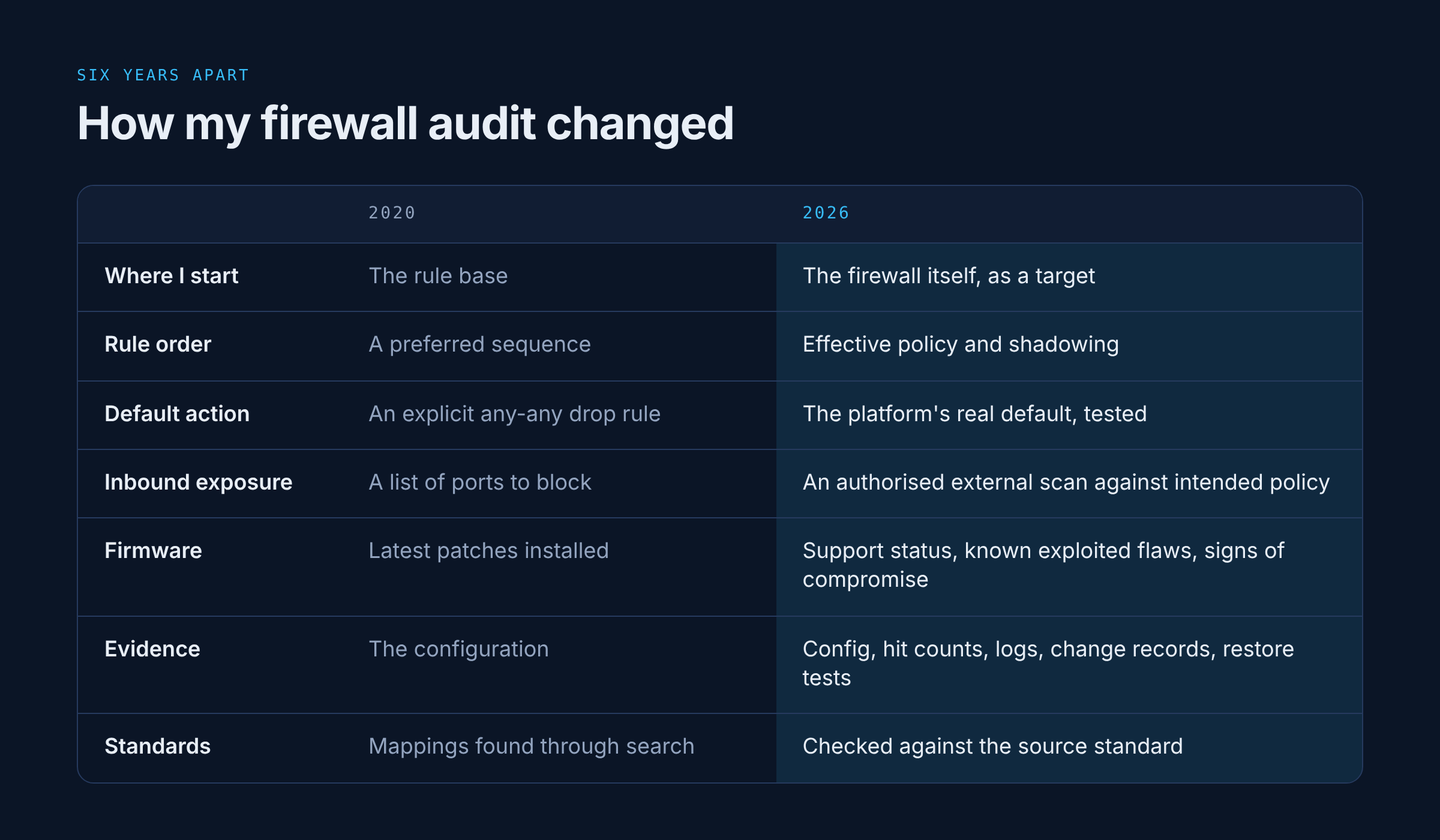
The core of this list has barely changed since 2020. What's changed is where the list starts. Back then I would have opened the rule base first. Today I'd start with the firewall itself, because that's where attackers have been starting too.
References
Threats to the firewall itself
CISA, Emergency Directive 25-03: Identify and Mitigate Potential Compromise of Cisco Devices
Cisco, Security advisory on ASA and FTD persistence (CISA ED 25-03)
ASD's ACSC, New steps for organisations running Cisco Firepower and Secure Firewall products
CISA, ACSC, NCSC UK and partners, Security considerations for edge devices
CISA, BOD 23-02: Mitigating the Risk from Internet-Exposed Management Interfaces
Standards and frameworks
Addressing and protocols
Platform documentation
Palo Alto Networks, Security Policy Overview
AWS, Security groups and Network ACLs